Higher frame rates have become one of the most debated topics in modern PC gaming, especially as 144 Hz, 240 Hz, and even 360 Hz displays become more common. Competitive players often claim that higher FPS provides a real gameplay advantage, while others argue that anything above 60 FPS is unnecessary because the human eye cannot perceive it. Understanding whether higher FPS actually matters requires separating hardware marketing myths from how games, displays, and human perception really work. Before deciding if higher FPS gives you an advantage, it helps to understand what FPS is, how it is produced, and how it affects gameplay beyond what you can simply “see” on screen.
What is FPS
FPS stands for frames per second, and it describes how many individual images your system renders every second while a game is running. If a game is running at 60 FPS, it means your computer is producing 60 separate frames every second. At 120 FPS, that number doubles, resulting in more frequent visual updates.
FPS is different from resolution or graphics quality. Resolution affects how sharp an image looks, while FPS affects how smooth and responsive the game feels. A game can look visually impressive at low FPS but still feel sluggish, while a simpler-looking game can feel extremely fluid at high FPS.
It is also important to distinguish FPS from refresh rate. FPS is how fast your computer generates frames, while refresh rate, measured in hertz (Hz), is how many times your display can update per second. To fully benefit from higher FPS, your monitor’s refresh rate needs to be high enough to display those extra frames.
Understanding FPS is the foundation for answering whether higher frame rates provide a real gameplay advantage, because the benefits go beyond visuals alone.
How do you get more FPS
FPS is the result of how efficiently your system can process game data and render frames. Increasing it usually involves a combination of hardware capability, software settings, and system configuration.
The most direct way to gain more FPS is through graphics settings. Lowering options such as shadows, reflections, volumetric effects, and anti-aliasing reduces the workload on your GPU. Many competitive players deliberately use low or medium settings, not because their hardware cannot handle higher visuals, but because it maximizes frame rate and consistency.
Hardware still plays the largest role. The graphics card has the biggest impact on FPS, followed by the CPU in CPU-heavy games such as large multiplayer titles, strategy games, or esports shooters. Insufficient RAM or slow storage can also limit performance by causing stutters or inconsistent frame delivery, even if average FPS appears high.
Modern upscaling technologies also play a major role in boosting FPS. DLSS (Deep Learning Super Sampling) from NVIDIA and FSR (FidelityFX Super Resolution) from AMD render games at a lower internal resolution and upscale the image back to your target resolution. This significantly reduces GPU workload and can result in large FPS gains with relatively small visual trade-offs, especially at higher resolutions.
Some newer games also support frame generation, sometimes referred to as “fake frames.” Instead of rendering every frame traditionally, the system generates intermediate frames using motion data from previous frames. This can dramatically increase reported FPS, particularly on supported GPUs. However, because these generated frames are not based on new player input, they do not reduce input latency in the same way as native FPS increases. For competitive gameplay, frame generation improves smoothness but does not provide the same responsiveness benefits as higher real FPS.
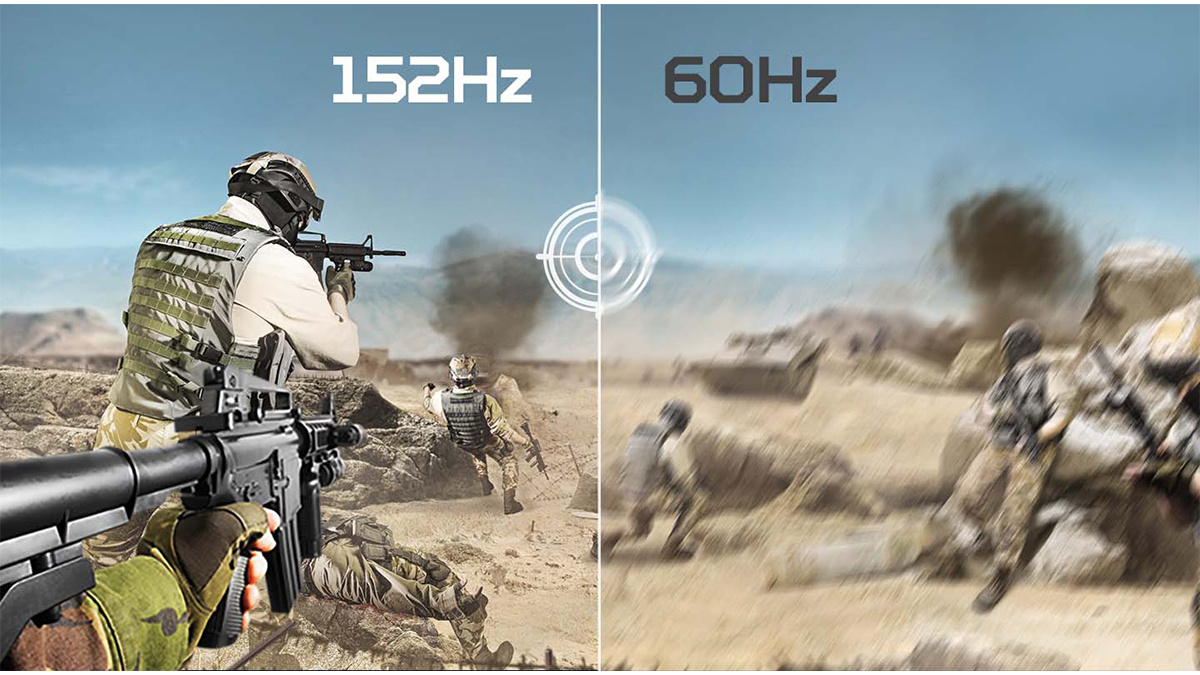
Finally, your display determines how much of this extra performance you can actually use. A 60 Hz monitor cannot display more than 60 frames per second, while high-refresh-rate displays can take advantage of much higher frame rates. This distinction becomes critical when evaluating whether higher FPS actually provides a gameplay advantage.
Does high FPS matter if the human eye can only see 30–60 FPS?
The idea that the human eye can only see 30 or 60 FPS is a persistent myth, and it oversimplifies how human vision actually works. The human visual system does not perceive the world in discrete frames the way a computer renders images. Instead, it processes motion, changes, and timing continuously.
What people are often referring to when they cite “30–60 FPS” is the point at which motion starts to look smooth rather than choppy. That does not mean the brain stops benefiting from higher frame rates. As FPS increases, motion becomes clearer, blur is reduced, and fast-moving objects are easier to track. These improvements continue well beyond 60 FPS, especially in interactive content like video games.
Another key factor is latency, not just visual clarity. Higher FPS reduces the time between frames, which means your inputs are reflected on screen more quickly. Even if two frame rates look similar at a glance, the one with higher FPS will feel more responsive because the game is updating more frequently.
This is why players can reliably tell the difference between 60 FPS and 120 FPS, and often between 120 FPS and 240 FPS, even if they cannot articulate it as “seeing more frames.” The benefit is not just about what you see, but how quickly the game responds to what you do.
Understanding this distinction is crucial before evaluating how higher FPS actually affects gameplay performance and competitive advantage.
How does higher FPS impact gameplay?
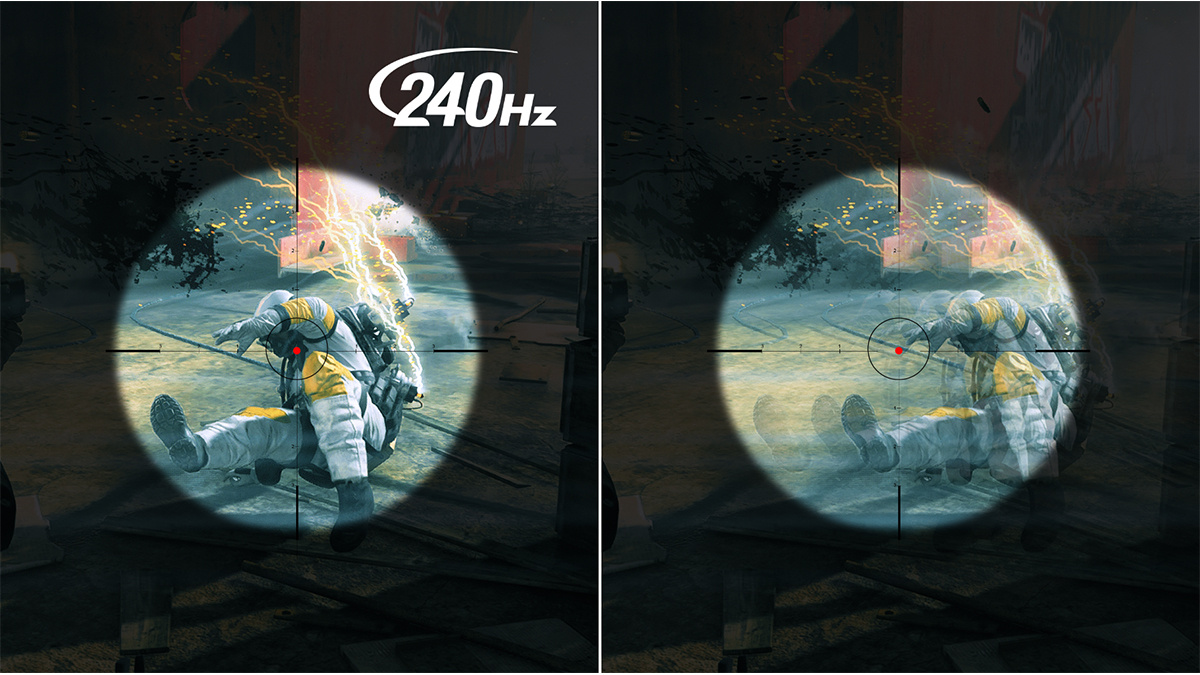
Higher FPS affects gameplay in ways that go beyond visual smoothness. The benefits are primarily tied to responsiveness, clarity, and consistency rather than graphics quality.
- Lower input latency
Higher FPS reduces the time between frames, which means your inputs are reflected on screen faster. This makes aiming, movement, and reactions feel more immediate, especially in fast-paced games. - Clearer motion during fast movement
Objects moving quickly across the screen appear sharper and easier to track at higher frame rates. This improves target tracking in shooters and reduces visual blur during rapid camera movement. - More consistent frame delivery
A stable high FPS with even frame times feels smoother than a fluctuating frame rate. Consistency helps actions feel predictable, which is important for timing-based gameplay and muscle memory. - Improved responsiveness in competitive play
Higher FPS does not increase player skill, but it removes technical delays between input and on-screen feedback. This allows skilled players to react more precisely to in-game situations. - Reduced visual strain over long sessions
Higher frame rates can feel more comfortable over extended play sessions, particularly on high-refresh-rate monitors, because motion appears smoother and less jittery.
These advantages become most noticeable in competitive and fast-action games, where small differences in responsiveness and clarity can affect outcomes. In slower-paced or turn-based games, the impact of higher FPS is far less significant.
When higher FPS stops making a meaningful difference
While higher FPS does provide real benefits, those benefits are not unlimited. At a certain point, the gains become smaller, and most players will no longer notice a meaningful improvement in gameplay.
The jump from 30 FPS to 60 FPS is dramatic. Motion becomes smoother, input delay is reduced, and games feel far more responsive. The jump from 60 FPS to 120 FPS is still very noticeable, especially on a high-refresh-rate display, with clearer motion and faster response to inputs.
Beyond that, the returns start to diminish. Moving from 120 FPS to 240 FPS still reduces latency and improves motion clarity, but the improvement is more subtle and primarily noticeable to competitive or highly experienced players. The difference between 240 FPS and 360 FPS is even smaller and often difficult to perceive outside of specific esports scenarios.
There are also practical limits. Many games become CPU-bound at very high frame rates, meaning performance stops scaling even with a powerful GPU. Maintaining extremely high FPS can also require lowering graphics settings to a point where visual quality suffers without providing proportional gameplay benefits.
For most players, the sweet spot is a stable frame rate that matches their monitor’s refresh rate, typically 60 Hz, 120 Hz, or 144 Hz. Once that target is reached consistently, further FPS gains tend to offer diminishing returns unless competitive performance is the primary goal.
Conclusion
Higher FPS does provide a real advantage in gaming, but the size of that advantage depends on how and what you play. Moving from low frame rates such as 30 FPS to 60 or 120 FPS delivers clear improvements in smoothness, responsiveness, and input latency. Those gains directly affect how a game feels and how quickly it reacts to player input. Beyond that range, higher FPS continues to offer benefits, especially in competitive and fast-paced games, but the improvements become more incremental and are most noticeable to experienced players.
The key takeaway is that higher FPS is not about visuals alone. It is about reducing delay between your actions and what happens on screen, improving motion clarity, and maintaining consistent performance. To achieve this reliably in modern games, you need hardware that can sustain high frame rates without throttling or unstable frame times.
For players who want to push high FPS without compromise, Acer Predator laptops are built with this exact use case in mind. With high-refresh-rate displays, powerful GPUs, and cooling systems designed for sustained performance, Predator systems are well suited for esports titles and demanding AAA games alike. If high FPS and responsive gameplay are priorities, choosing hardware designed for that workload ensures your system is enabling your performance rather than limiting it.
In short, higher FPS does matter in gaming, and pairing it with capable hardware is what turns higher numbers into a real gameplay advantage.
FAQ
Does higher FPS actually give you an advantage in gaming?
Yes, in many cases. Higher FPS reduces input latency and improves motion clarity, which can help with reaction time and tracking in fast-paced games. The advantage is most noticeable in competitive shooters and action games.
Is 60 FPS enough for gaming?
For many players, yes. 60 FPS provides smooth gameplay and is perfectly fine for single-player, casual, and slower-paced games. Competitive players often benefit from higher FPS, especially on high-refresh-rate monitors.
Can the human eye see more than 60 FPS?
The human eye does not see in frames, but people can perceive improvements beyond 60 FPS. Higher FPS improves motion clarity and responsiveness, which is why many players can feel the difference between 60, 120, and even higher frame rates.
Does FPS matter more than graphics quality?
It depends on the game and the player. Competitive players usually prioritize FPS and consistency over visual fidelity. For cinematic or story-driven games, higher graphics settings may matter more than very high FPS.
Does higher FPS reduce input lag?
Yes. Higher FPS shortens the time between frames, which means your inputs appear on screen faster. This can make aiming, movement, and reactions feel more immediate.
Do technologies like DLSS and FSR really increase FPS?
Yes. DLSS and FSR increase FPS by rendering games at a lower internal resolution and upscaling the image. This reduces GPU workload and can significantly boost performance with minimal visual impact.
Do generated or “fake” frames give the same advantage as real FPS?
Not entirely. Frame generation improves smoothness but does not reduce input latency in the same way as native FPS. It can make games feel smoother, but it is less beneficial for competitive gameplay.
Do I need a high-refresh-rate monitor to benefit from high FPS?
Yes. To fully see higher FPS, your monitor’s refresh rate must be high enough. A 60 Hz display cannot show more than 60 frames per second, even if your system is rendering more.
Recommended Products
Acer Nitro V 16S AI (RTX 5060)
Buy Now |

Predator Triton 14 AI (RTX 5070)
Buy Now |

Predator Helios 18 AI (RTX 5080)
Buy Now |
|---|








