
Learning today isn’t just about finding information - it’s about making sense of it. Whether you’re studying for a course, researching a topic, or trying to get through a stack of articles, the challenge is often organizing everything and understanding how it all fits together.
NotebookLM aims to solve that problem. Built by Google as an AI-powered research and study assistant (you can check it out directly here), it helps you work directly with your own materials such as notes, documents, transcripts, and articles into an interactive workspace where you can ask questions, generate explanations, and explore ideas more clearly. Instead of searching the web, NotebookLM focuses on what you give it, helping you build a deeper understanding of the content you’re already working with.
In this article, we’ll cover:
- What NotebookLM is and how it works
- How it differs from a general-purpose AI chatbot
- Ways it can support studying, research, and self-directed learning
- Key features that benefit students and educators
- A brief look at where NotebookLM might go next
What Is NotebookLM and How Does It Work?
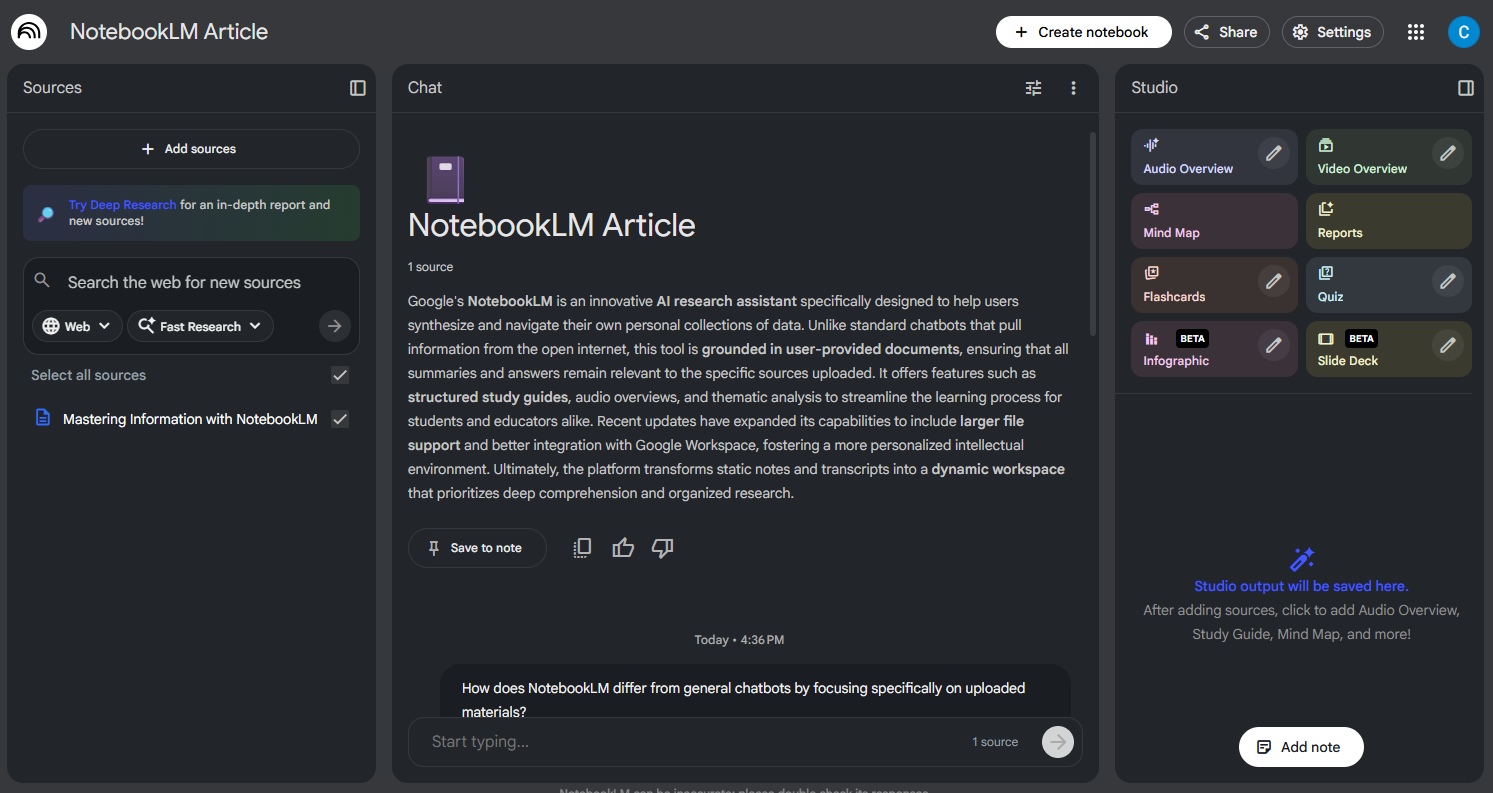
NotebookLM is Google’s AI-assisted research and learning tool designed to help you work more effectively with your own materials. Unlike general AI chatbots that pull from the broader internet, NotebookLM focuses entirely on the documents, notes, and sources you upload, creating a controlled and personalized environment for studying or research - something especially appreciated by Educators, who can align content closely with their syllabus when preparing lessons.
When you create a notebook, you can add PDFs, Google Docs, transcripts, or pasted text. NotebookLM then analyzes your content and allows you to ask questions directly about your sources, generate summaries or explanations, create outlines and study guides, and identify key themes, connections, or inconsistencies. Because it stays grounded in your materials, the responses tend to be more focused and relevant to your specific content. In essence, NotebookLM functions less like a general chatbot and more like a personal research assistant, helping you interpret, organize, and build understanding from the information you’re already working with.
How NotebookLM Differs from other LLMs
Most AI chatbots are already designed to answer broad questions by pulling from a wide range of online information. NotebookLM works differently. Instead of searching the internet, it stays grounded in the specific materials you’ve added to your notebook.
Here’s what sets it apart:
- Source-anchored responses: NotebookLM only uses your uploaded documents as its knowledge base, making answers more focused, relevant, and predictable.
- Built-in document understanding: It can summarize long texts, compare sections, extract key points, or clarify concepts directly within your materials.
- Structured workspace: Rather than being just a chat window, NotebookLM organizes content into notebooks, making it easier to manage readings across different classes, research projects, and other class materials.
- Designed for deeper learning: The tool helps you generate study guides, outlines, explanations, and follow-up questions all tailored to the sources you provide.
This makes NotebookLM less of a general conversational tool and more of a purpose-built companion for learning, research, and content analysis. You can watch a quick video of exactly how it works and get started here:
How NotebookLM Supports Learning and Research
NotebookLM is designed to make it easier to understand complex material, organize information, and stay focused on what matters. By working directly with the content you upload, it helps streamline tasks that typically take time and mental energy.
Some of the ways it can help include:
- Summarizing long readings
- Creating structured and scalable study materials
- Clarifying concepts and terminology
- Highlighting connections across documents
These capabilities make NotebookLM not only practical but also adaptable for a wide range of learners. Teachers and educators can define the scope and level of information appropriate for different grades, ensuring that students absorb material at the right pace rather than being exposed to unlimited or off-topic content from the broader internet.
NotebookLM also supports accessible learning through features such as audio overviews, allowing students to listen to summaries or explanations of their materials - an option that can be especially helpful for learners with special needs or different learning preferences. By turning scattered notes, transcripts, and articles into a single, interactive workspace, it allows learners to focus on comprehension and insight rather than on managing information.

Always Improving: Recent New Features
If you are already familiar with NotebookLM, you should be aware that it continues to evolve with several recent improvements that make it even more capable as a personal learning assistant. These upgrades include:
- Larger context window: Now able to handle bigger readings and more complex notebooks than before.
- Smarter, more coherent reasoning: Responses are clearer and better structured.
- Better memory across chats: Retains context more effectively, making follow-up questions more meaningful.
- ‘Discover Sources’: Can now suggest helpful web references to complement your own materials.
- Expanded file support and seamless Gmail/Drive integration: Allows for more flexible uploading for Word Documents, PDFs, and working directly with Google Workspace files.
Together, these enhancements make NotebookLM not just a tool for organizing notes, but a more intelligent, responsive companion that adapts to your learning and research needs.
Where NotebookLM Might Go Next
While NotebookLM is still evolving, its direction is clear: creating a more personalized, source-grounded way to learn. As AI tools become more integrated into everyday study routines, NotebookLM has the potential to support even more formats, richer collaboration features, and deeper integrations with the apps students already use.
For many learners, this also raises the importance of having devices that can support AI-driven study tools smoothly. Acer’s range of Chromebooks, including models designed for students and classrooms such as the Acer Chromebook Plus Spin 514, offer seamless access to NotebookLM and Google Workspace. With its convertible 2-in-1 design, 14-inch WUXGA display, and all-day battery life, it’s well suited for reading, research, and AI-assisted learning workflows. College students who purchase a Chromebook Plus for themselves can also enjoy 12 months free of Google AI Pro (a nearly $240 value), making it an accessible way to explore AI-enhanced learning from day one..
NotebookLM is still new, but it’s already changing how people understand and interact with their own materials. The best way to see its potential is to try it with content you’re working on right now - whether it’s a class reading, a research topic, or notes from a project.
Featured Products








