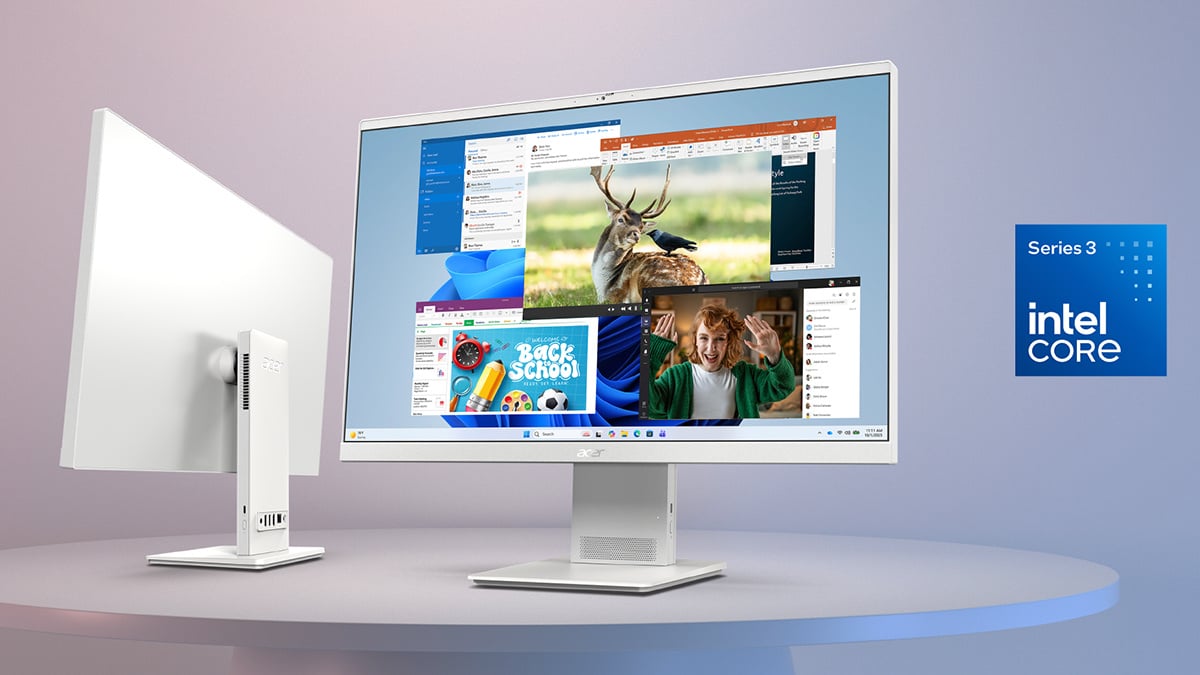
The refreshed Acer Aspire S 27 and Aspire S 24 bring Intel Core Series 3 processors, optional touch and stylus support, and a clean white aluminum design to the family desk. We compare their screens, explore everyday features and connectivity, and cover their planned Q4 2026 arrival in EMEA.
This first look at the Acer Aspire S 27 and Aspire S 24 covers their updated hardware, display choices and appeal as family all-in-one desktops . Both combine Windows 11 computing with a minimalist white design, now offering Intel Core Series 3 processors and an optional touchscreen with stylus support. If your household needs somewhere to tackle homework, take calls and deal with life’s endless online admin, these machines are designed to give it a permanent home.
The Acer Aspire S series comes in 27-inch and 23.8-inch versions, with narrow bezels and an aluminum chassis. There’s no separate tower to accommodate, and the styling should sit comfortably in a shared room. Before you clear a space, though, it’s worth checking the differences between the two sizes. There’s more going on here than a few extra inches.
What’s an all-in-one desktop computer? An all-in-one desktop computer houses the computer hardware and display in one unit. Add your keyboard and mouse, connect the power and you have the basic arrangement, without finding somewhere for a separate tower. That means less equipment competing for space beneath the desk and fewer connections running between separate boxes.
For a family, the appeal goes beyond tidying up. A shared computer gives homework, household paperwork and video calls a regular spot, rather than having everything migrate across the dining table. It also means the laptop someone needs for work can stay in their bag. An all-in-one desktop makes sense when you want a permanent setup with a generous screen, especially in a room that has several other jobs to do.
Recently announced in Berlin during IFA 2026, the Aspire S follows that brief with a slim white design and an integrated display. It’s the sort of computer you could put in a living room without feeling obliged to explain the décor.
Both refreshed models maintain the minimalist look of the previous Aspire S generation. The white aluminum chassis keeps the appearance clean, while the all-in-one format saves you arranging a computer and monitor separately. There will still be cables, of course. Buying a tidy computer doesn’t automatically sort out the printer, charging leads and mystery adapter you’ve kept since 2014.
The stand lets you tilt the display from -5° to 20°, giving you some adjustment when getting comfortable. That’s useful on a shared machine where the next person sitting down might be a foot shorter than you. Both models also have narrow bezels and a 90% screen-to-body ratio, keeping the surrounding frame modest and giving the screen room to do its thing.
Acer Aspire S 27 or Aspire S 24?
The Acer Aspire S 27 (S27B-WCLLP) offers a 27-inch display, with either QHD resolution at 120Hz or Full HD at 144Hz. The Acer Aspire S 24 (S24B-WCLLP) has a 23.8-inch Full HD display at 144Hz. Screen size is the obvious dividing line, but the S 27’s QHD option deserves attention if you spend plenty of time reading, writing or comparing documents.
The QHD panel packs more pixels into the S 27’s larger screen, providing greater detail for text, images and desktop content. It’s the option to investigate if your usual routine involves keeping reference material beside a document or working through a spreadsheet with more columns than seems reasonable. The 27-inch size could also appeal when watching shows, provided the desk has enough room.
The Aspire S 24 keeps things more compact while retaining the Full HD resolution of the corresponding S 27 configuration. Its 144Hz refresh rate can make scrolling and desktop movement appear smoother than on a conventional 60Hz screen. That’s a welcome everyday feature, although refresh rate alone doesn’t tell you how a computer will perform in games. Choose around your space and workload first.
Touch and stylus support on the side This generation adds a touchscreen option with support for an optional stylus. Selected models let you tap, navigate, take notes and sketch directly on the display, giving a shared computer another way to handle the day’s work. Keyboard and mouse remain ready for typing and precise navigation, with direct input available when it suits the task.
That could mean drawing a diagram while helping with homework, marking up a document or sketching a rough idea before it disappears from your head. Sometimes a quick circle and an arrow save everyone five minutes of explanation. Touch availability depends on the configuration, and the stylus is optional, so check the exact model rather than assuming every Aspire S comes ready for pen input.
Intel Core Series 3 handles your daily duties
The refreshed Aspire S models run Windows 11 and use Intel Core Series 3 processors, with configurations offering up to an Intel Core 7 processor 350. Acer positions them for work, learning, entertainment and multitasking, which is a fair description of the average family computer’s job list. It needs to be ready for a work document in the morning, a school presentation in the afternoon and whatever everyone wants to watch afterward.
Configurations extend to 16GB of LPDDR5 memory and 1TB of M.2 SSD storage. Memory helps accommodate the applications and tasks you have open, while storage gives you space for software, documents, photos and media. If your household treats closing browser tabs as an admission of defeat, the memory specification deserves a proper look before you buy.
Those figures are announced maximums, rather than standard equipment across the range. Processor, display, memory and storage choices vary by model and region. When comparing an Acer all-in-one desktop, check the complete configuration alongside the screen size. Two machines can look much the same on a product page and come with different hardware inside.
Clear video calls, privacy when you’re done
Both models include a Full HD 1080p webcam with a privacy shutter, covering work meetings, online learning and family catch-ups. Having the camera built in removes another accessory from the shopping list and another cable from the desk. Acer also lists Windows Studio Effects among the series’ calling features.
Once the call ends, slide the shutter closed. It’s a simple physical control, and an easy one for everyone using the computer to understand. The camera can’t stop a meeting running into lunch, but at least you won’t need to excavate a drawer looking for a webcam before joining.
Connections for the family setup Wireless connectivity includes Intel Wi-Fi 6E and Bluetooth 5.3, supporting network access and compatible wireless accessories. Acer also lists an HDMI port and one USB 3.2 Gen 1 Type-C port. The USB-C port is specified for data transfer only, so don’t assume its connector shape means it also handles video output or laptop-style charging duties.
The series also includes Acer Sense and Acer Intelligence Space , which Acer describes as providing smart insights and personalized recommendations. They add to the software offering, while the everyday buying decisions remain familiar: choose enough memory and storage, get the screen you want, and make sure the connections suit your accessories.
Availability and choosing your Aspire S The refreshed Aspire S series is scheduled to arrive in EMEA in Q4 2026. Pricing has not been provided in the supplied announcement, and specifications and availability will vary by region. For anyone shopping for an Acer all-in-one desktop computer, the Aspire S 24 offers a smaller setup, while the Aspire S 27 provides more screen space and a QHD option. Both combine updated Intel processing with a tidy design and useful features for a shared home computer. Pick the configuration around what your household actually does, then work out whose turn it is to use it. Be sure to check out the other all in one Acer desktops , and don’t forget the 15% student discount to leave a little more in the kitty for life beyond the desk.
FAQ
The S 27 has a 27-inch screen with QHD 120Hz or Full HD 144Hz options. The S 24 has a 23.8-inch Full HD 144Hz screen.
No. Touch is available on selected models, with support for an optional stylus.
Intel Core Series 3 processors, with configurations up to an Intel Core 7 processor 350.
Acer specifies the USB 3.2 Gen 1 Type-C port for data transfer only.
Recommended Products